

Updated Guide on How to use PickLah
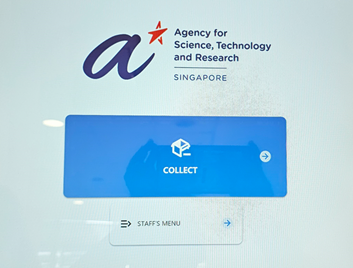
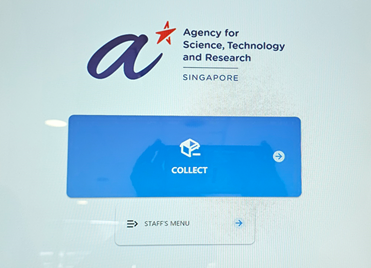
1: Select “Collect” Option:
Navigate to the main locker screen and select the “Collect” option.
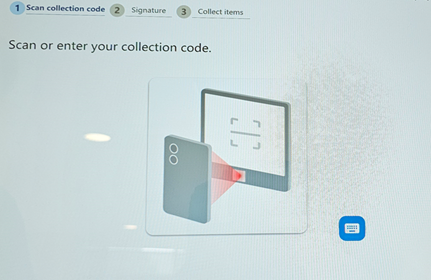
2: Scan QR Code:
Scan the unique QR code (which can be found in the Picklah collection email) onto the barcode reader at the bottom of the screen.
.png?sfvrsn=767b9e37_1)
.png?sfvrsn=26072bfd_1)
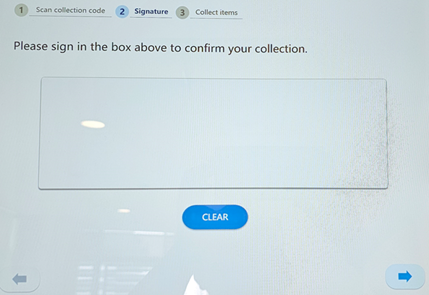
3: Provide your name:
Write your name on the locker interface and click on the arrow at the bottom right corner of the screen to proceed.
4: Unlock locker and retrieve order:
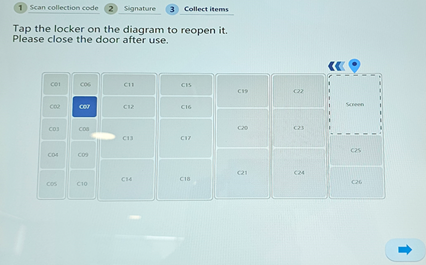
Locker will unlock and open. Retrieve your order from the inside.
5: Close the locker door securely:
Once the order is retrieved, ensure to securely close the locker door to avoid penalty fees. Click on the arrow at the bottom right corner of the screen to proceed.
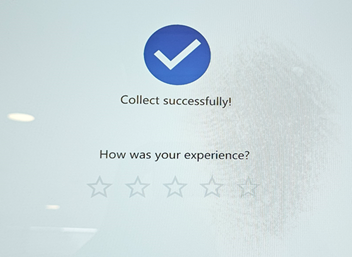
6: Rate us:
Please rate your satisfaction level for the Picklah service, from 1 star (very dissatisfied) to 5 stars (very satisfied)
Option 2: Retrieve Order Via Collection Code
1: Select “Collect” Option:
Navigate to the main locker screen and select the “Collect” option.
2: Click on the keyboard icon:
Click on the keyboard icon screen at bottom right corner of the screen to bring up the digital keyboard.
3: Enter Collection Code:
Enter the unique collection code (code is case-sensitive and can be found in the Picklah collection email) and click on the arrow at the bottom right corner of the screen to proceed.
.png?sfvrsn=2e4b2d95_1)
.png?sfvrsn=2d5b97cf_1)
4: Provide your name:
Write your name on the locker interface and click on the arrow at the bottom right corner of the screen to proceed.
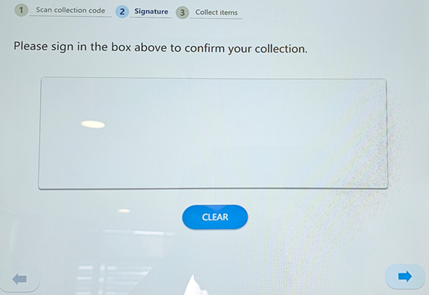
5: Unlock locker and retrieve order:
Locker will unlock and open. Retrieve your order from the inside.
6: Close the locker door securely:
Once the order is retrieved, ensure to securely close the locker door to avoid penalty fees. Click on the arrow at the bottom right corner of the screen to proceed.
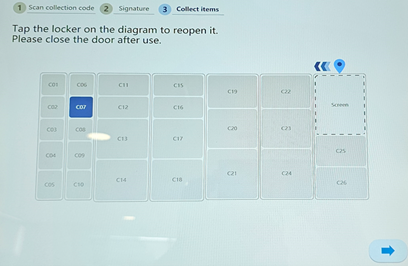
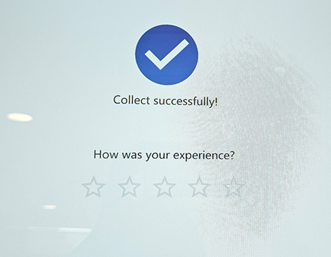
7: Rate us:
Please rate your satisfaction level for the Picklah service, from 1 star (very dissatisfied) to 5 stars (very satisfied)
Frequently Asked Questions
1: Why choose Picklah?
- Enjoy secure, 24/7 access to your orders at a nearest convenient location.
- To prepare for the transition to Geneo and initiate the gradual discontinuation of self-collection at the LSS store.
- To optimize available space at the RSC store given current storage constraints.
2: Picklah current locations
- Picklah @ Proteos: 61 Biopolis Drive, Level 6 (near skybridge), Singapore 138673
- Picklah @ Centros: 20 Biopolis Way, Level 5 (near skybridge), Singapore 138668
- Picklah @ Immunos: 8A Biomedical Grove, Level 1 (near to lobby/toilet), Singapore 138665
3: What is required to collect your items at the Picklah lockers?
- Your collection email with either the QR Code or the “Collection Code” clearly stated
- Login via QR Code: Scan the QR Code at the kiosk reader. Enter your name, press enter, and collect your items. Close the door securely after collection to prevent any penalty fees.
- Login via email address: Enter the email address used when placing orders. Enter the “Collection Code”. Write your name, press enter and collect the items. Close the door securely after collection to prevent any penalty fees.
4: Is there a time limit for the items collected from the Picklah lockers?
- Users are encouraged to collect their items within 3 days. An email notification will be sent when items are ready for collection, and a system reminder will be issued after 3 days if the items remain uncollected.
5: Can we be excluded from Picklah?
- At present, it is not possible to exclude any users from the Picklah initiative. Users are encouraged to use the lockers for 24/7 convenient collection, which improves efficiency and save space at RSC store. As we transition to Geneo, locker collection will become the standard as self-collection will slowly be phased out.
For additional questions or issues encountered at the Picklah lockers, please email RSC_Enquiries@a-star.edu.sg. For urgent matters, contact 6407 0400 during office hours.
